
41
Free Computer Music Programs / Audacity Unconference 2014 by ...
Last post by Tony Edge - April 04, 2014, 10:23:14 AMA Fabulous event for the best free audio tool in the world today.
Audacity Unconference 2014 (AU14)
The Audacity Unconference 2014 (AU14) is an event for all Audacity users including teachers, musicians, and researchers.
It will run from Friday 11th to Saturday 12th July 2014 and you can book either day or both.
It is hosted by UCLan (University of Central Lancashire) in Preston, England.
Developers and support people will be there and so you will have an opportunity to talk to them as well as other users. We?d love to see you there!
Please see Audacity_Unconference_2014 for more details.
http://wiki.audacityteam.org/wiki/Audacity_Unconference_2014
They may run sessions on:
Audacity for noobs, first lessons
The use of Audacity in Audio - Visual sequences
Radio Journalism and Audacity
Mixing
Teaching/composing with children in school with Audacity
How we used it in our library
Nyquist and what it has to offer
HCI of Audacity in comparison to other Audio Software
Music
They want to attend sessions on:
(these have been grouped and ordered a little)
Basic User How To / Audacity for noobs, first lessons.
Interested in learning about basic sound cleanup/treatment for podcast/video soundtrack
Learn techniques, procedures, effects, equipment recommendations and why's
Sessions to create better podcasts and music from scratch
Audacity/podcasts for Post-Beginners: avoiding screw-ups, making-do (budgetwise), and any clever tricks that aren't too hard!
Getting to learn how the program works, how it has been working for others indifferent settings, whether there is any other like software for deaf people too
Using audacity in self-recording
Tips and features
Ways to use effects
Creating children's music
Benefits/uses of different file extensions
Best practices Professional workshops
Audacity workshop Advanced Audacity user plug-ins
Learning from professionals, stuff about plugins, talks on sound + music
Audacity for sixth form sound investigations - using it to calculate frequecy, wavelengths etc.
Using audacity to help to teach sound and waves in school
Uses of audacity in science experiments
Tutorials and workshops on how to introduce students 16-18 to audacity
Education - composing in elementary & secondary school. Developing teaching material.
Using audacity in higher education and libraries.
Learning how to use audacity and using the application in school linked to the EYFS and new curriculum
I want to make music
Meet other acoustic musicians and/or singer-songwriters
Listening to other's music / Listening to cool stuff done on Audacity
Voice Acting/Actors on YouTube panel
Demonstrating how Audacity helps me as an experimental musician
A band and a bar.
Possibly cookout/BBQ/Stove Geek session
Resume of the last improvements - New possible functions - New mobile compatibility - Future of Audacity
What is in mind development wise / Discussing improvements that could be made to Audacity
Discussion on improving the software
Listening to any technical, how to or similar talks
Interest in discussion about technical resources and content delivery ideas
Workshops (code and research), hack sessions
Latency problems, VST-Plug-ins
Plugins
Nyquist programming
Quote from wikipedia:
Nyquist is a programming language for sound synthesis and analysis based on the Lisp programming language. It is an extension of the XLISP dialect of Lisp.
With Nyquist, the programmer designs musical instruments by combining functions, and can call upon these instruments and generate a sound just by typing a simple expression. The programmer can combine simple expressions into complex ones to create a whole composition, and can also generate various other kinds of musical and non-musical sounds.
The Nyquist interpreter can read and write sound files, MIDI files, and Adagio text-based music score files. On many platforms, it can also produce direct audio output in real time.
The Nyquist programming language can also be used to write plug-in effects for the Audacity digital audio editor.
One notable difference between Nyquist and more traditional MUSIC-N languages is that Nyquist does not segregate synthesis functions (see unit generator) from "scoring" functions. For example Csound is actually two languages, one for creating "orchestras" the other for writing "scores". With Nyquist these two domains are combined.
Nyquist runs under Linux and other Unix environments, Mac OS, and Microsoft Windows.
The Nyquist programming language and interpreter were written by Roger Dannenberg at Carnegie Mellon University, with support from Yamaha Corporation and IBM.
http://wiki.audacityteam.org/wiki/Audacity_Unconference_2014
Audacity Unconference 2014 (AU14)
The Audacity Unconference 2014 (AU14) is an event for all Audacity users including teachers, musicians, and researchers.
It will run from Friday 11th to Saturday 12th July 2014 and you can book either day or both.
It is hosted by UCLan (University of Central Lancashire) in Preston, England.
Developers and support people will be there and so you will have an opportunity to talk to them as well as other users. We?d love to see you there!
Please see Audacity_Unconference_2014 for more details.
http://wiki.audacityteam.org/wiki/Audacity_Unconference_2014
They may run sessions on:
Audacity for noobs, first lessons
The use of Audacity in Audio - Visual sequences
Radio Journalism and Audacity
Mixing
Teaching/composing with children in school with Audacity
How we used it in our library
Nyquist and what it has to offer
HCI of Audacity in comparison to other Audio Software
Music
They want to attend sessions on:
(these have been grouped and ordered a little)
Basic User How To / Audacity for noobs, first lessons.
Interested in learning about basic sound cleanup/treatment for podcast/video soundtrack
Learn techniques, procedures, effects, equipment recommendations and why's
Sessions to create better podcasts and music from scratch
Audacity/podcasts for Post-Beginners: avoiding screw-ups, making-do (budgetwise), and any clever tricks that aren't too hard!
Getting to learn how the program works, how it has been working for others indifferent settings, whether there is any other like software for deaf people too
Using audacity in self-recording
Tips and features
Ways to use effects
Creating children's music
Benefits/uses of different file extensions
Best practices Professional workshops
Audacity workshop Advanced Audacity user plug-ins
Learning from professionals, stuff about plugins, talks on sound + music
Audacity for sixth form sound investigations - using it to calculate frequecy, wavelengths etc.
Using audacity to help to teach sound and waves in school
Uses of audacity in science experiments
Tutorials and workshops on how to introduce students 16-18 to audacity
Education - composing in elementary & secondary school. Developing teaching material.
Using audacity in higher education and libraries.
Learning how to use audacity and using the application in school linked to the EYFS and new curriculum
I want to make music
Meet other acoustic musicians and/or singer-songwriters
Listening to other's music / Listening to cool stuff done on Audacity
Voice Acting/Actors on YouTube panel
Demonstrating how Audacity helps me as an experimental musician
A band and a bar.
Possibly cookout/BBQ/Stove Geek session
Resume of the last improvements - New possible functions - New mobile compatibility - Future of Audacity
What is in mind development wise / Discussing improvements that could be made to Audacity
Discussion on improving the software
Listening to any technical, how to or similar talks
Interest in discussion about technical resources and content delivery ideas
Workshops (code and research), hack sessions
Latency problems, VST-Plug-ins
Plugins
Nyquist programming
Quote from wikipedia:
Nyquist is a programming language for sound synthesis and analysis based on the Lisp programming language. It is an extension of the XLISP dialect of Lisp.
With Nyquist, the programmer designs musical instruments by combining functions, and can call upon these instruments and generate a sound just by typing a simple expression. The programmer can combine simple expressions into complex ones to create a whole composition, and can also generate various other kinds of musical and non-musical sounds.
The Nyquist interpreter can read and write sound files, MIDI files, and Adagio text-based music score files. On many platforms, it can also produce direct audio output in real time.
The Nyquist programming language can also be used to write plug-in effects for the Audacity digital audio editor.
One notable difference between Nyquist and more traditional MUSIC-N languages is that Nyquist does not segregate synthesis functions (see unit generator) from "scoring" functions. For example Csound is actually two languages, one for creating "orchestras" the other for writing "scores". With Nyquist these two domains are combined.
Nyquist runs under Linux and other Unix environments, Mac OS, and Microsoft Windows.
The Nyquist programming language and interpreter were written by Roger Dannenberg at Carnegie Mellon University, with support from Yamaha Corporation and IBM.
http://wiki.audacityteam.org/wiki/Audacity_Unconference_2014
42
General Discussion / Im happy I finally registered
Last post by MGumm - March 28, 2014, 01:14:35 PM43
The very best free downloads / Re: Free Sheet Music
Last post by Tony Edge - February 03, 2014, 12:01:19 AMWikifonia is no more.
The Wikifonia site is not available anymore.
A license to secure the rights of copyrighted works could not be extended.
There is no more access to the Wikifonia lead sheet database.
What a shame.
My solution download the midi file you want to play and open the file in a free music program. .
Midi Musical Instrument Digital Interface)
MIDI has been around for a long time technology was standardized in 1983 by the MIDI Manufacturers Association (MMA). All official MIDI standards are jointly developed and published by the MMA.
Advantages of MIDI include compactness (an entire song can be coded in a few hundred lines, i.e. in a few kilobytes), the midi instructions describe a music score in far more detail than ever a written score.
A lot of music programs all have different user interfaces and don?t have a common gateway to mix programs. A bit like before windows all programs had a stand alone user interface.
Band in a Box is good. For modifying notation and tracks Sibelius is my choice. Pity Band in a Box and Sibelius are not combined into one package.
The only common gateway between music programs is MIDI.
Advantages of using midi rather than printed score.
(1) Not only do you get the melody but also some amazing accompaniments.
(2) They are free
(3) It?s so easy to change the instruments, transpose, and simplify the music to your own musical ability. Pick out parts for Saxophone.
(4) Play along to the rhythm without a metronome.
(5) You can play the midi files in Windows Media Player and select the file that has the best sounds.
Windows 7 can be a bit fussy with midi. One solution is to use an alternative media player such as Apple quicktime.
If you don't get any midi sound to your speakers. Some sound cards output midi direct to your keyboard using Windows 7 Media player.
Ideal for listening to a few bars before loading into your music programs.
But the very best free midi player designed For Yamaha PSR & Tyros keyboards. XG soundcards or GM soundcards should work with most KYB's
Download the free MidiPlayer Version 8.3.1
by Michael Bedsem from http://psrtutorial.com/
Play files from a PC. Revoice instrument voices and OTS for your instrument, Repair files, Display and edit file data
Processing many files at once. Pass files to sequencers and other utility programs.
Accepts midi, pad, and styles from all recent instruments.
Windows 7. To set up your midi interface.
(a) Plug in your usb midi interface.
(b) Install MidiPlayer ver 8.3.1
(c) click on C:\Program Files\MidiPlayer\PLWMidiMap.cpl
(d) Select your usb to midi-keyboard.
(6) Part of the fun being able to arrange the music and printout beautiful score import lyrics. Include pictures.
Disadvantages using midi
(1) some editing is needed to make the music easy to read. But quite easy in programs like Sibelius.
(2) Midi sound quality is dependent of your sound card and of course the speed of your PC. Slow net books and very old laptops don?t sound good but hook up a good second hand Yamaha midi keyboard such as Yamaha PSR520 with the Yamaha XG midi set can be bought for about ?50 on EBay. Connect this to your HI FI for superb sound
Downloads and free programs
(1) Use Firefox as a browser with a plug-in downloadthemall is very useful plug-in to prevent having to download each file one by one.
Or for Google Chrome browser install a plugin ?Download Master?
chrome.google.com/webstore/detail/download-master/mcceagdollnkjlogmdckgjakjapmkdjf
Use the filter *.mdi to select just the midi files.
(2) After time you may end up with thousands of songs in your midi folders. Windows XP search is quite good but I find windows 7 search poor. A program named FileSearchEX by GOFF Concepts very good you can use it free for a month. But if you like the program it cost $5 just a few pounds in the UK. And they accept payment by PayPal.
(3) Sibelius demo can be downloaded free. Other free basic programs can be found on the Internet. Search Google for free music programs.
(4) Millions of Karaoke files can be downloaded free.
(5) To convert a .kar file just rename the file .mid or midi
If you have hundreds to convert copy the .kar files to a new folder but keep the .kar files they may come in use later.
(6) Conversion from a dos command prompt >rename *.kar *.mid
(7) Question after downloading hundreds of midi file they are all compressed as zip format.
How do I unzipp all the files in a folder all at once not one at a time.
download a free program 7-zip
highlight all the files right click "extract here".
7-Zip is open source software. Most of the source code is under the GNU LGPL license.
download from http://www.7-zip.org/
( How do I keep all my files up to date on all my computers. I have 40 GB, over a million midi files. I use an old 2.5? Sata disc drive that was redundant after an upgrade. From EBay bought a case for ?5.
This is the item description:-
2.5 SATA to USB HARD DRIVE CADDY HDD CASE ENCLOSURE - FOR external Use
Shell material: Aluminium - Dimensions: 129 x 75 x 12.5mm.No external power required. Plug in and play. Supports Windows 98/SE/ME/2000/XP/Vista/ Windows 7/Mac OS 8.6 or latest versions. Compatible with USB 2.0, SATA/ESATA. 480Mbps data processing speed.Stable and quick.
Large storage support. Hot-Swappable with Easy Plug & Play Supports 2.5" SATA Hard drives any speed up to 500GB Thickness 9.5mm. Product Details: Shell material: Aluminium Dimensions: 129 x 75 x 12.5mm.
Pack includes1 ? Leather Case1 ? Screwdriver2 ? Screws1 ? 2.5" Sata External Hard Case for Hard Disk Drive1 ? 1 to 2 USB Cable.
( A free program named Synkron keeps all my computers up to date in minutes using the external drive.
Synkron
Version 1.6.2
http://synkron.sourceforge.net/
Synkron is a simple Qt application designed for easy folder synchronisation.
This programme is distributed under the terms of the GPL v2.
2005-2014 Mat?? Tomlein
-----------------------------------------------------------
How do I prepare a music session with friends?
Use a free cloud program
Save your PDF or Midi or .sib file to the free cloud program
https://www.dropbox.com/
You can save the music to a folder on your computer by simply dragging and dropping any file to the dropbox folder.
For ease of use. Click on the shortcut on you desktop C:\Users\*\Dropbox
The free version allows 2gb of store space.
Invite your friends to join and practise the tunes prior to your music session
They will see the folder on their computer no need to email files.
Checkout tutorials on YouTube.
https://www.dropbox.com/
The Wikifonia site is not available anymore.
A license to secure the rights of copyrighted works could not be extended.
There is no more access to the Wikifonia lead sheet database.
What a shame.
My solution download the midi file you want to play and open the file in a free music program. .
Midi Musical Instrument Digital Interface)
MIDI has been around for a long time technology was standardized in 1983 by the MIDI Manufacturers Association (MMA). All official MIDI standards are jointly developed and published by the MMA.
Advantages of MIDI include compactness (an entire song can be coded in a few hundred lines, i.e. in a few kilobytes), the midi instructions describe a music score in far more detail than ever a written score.
A lot of music programs all have different user interfaces and don?t have a common gateway to mix programs. A bit like before windows all programs had a stand alone user interface.
Band in a Box is good. For modifying notation and tracks Sibelius is my choice. Pity Band in a Box and Sibelius are not combined into one package.
The only common gateway between music programs is MIDI.
Advantages of using midi rather than printed score.
(1) Not only do you get the melody but also some amazing accompaniments.
(2) They are free
(3) It?s so easy to change the instruments, transpose, and simplify the music to your own musical ability. Pick out parts for Saxophone.
(4) Play along to the rhythm without a metronome.
(5) You can play the midi files in Windows Media Player and select the file that has the best sounds.
Windows 7 can be a bit fussy with midi. One solution is to use an alternative media player such as Apple quicktime.
If you don't get any midi sound to your speakers. Some sound cards output midi direct to your keyboard using Windows 7 Media player.
Ideal for listening to a few bars before loading into your music programs.
But the very best free midi player designed For Yamaha PSR & Tyros keyboards. XG soundcards or GM soundcards should work with most KYB's
Download the free MidiPlayer Version 8.3.1
by Michael Bedsem from http://psrtutorial.com/
Play files from a PC. Revoice instrument voices and OTS for your instrument, Repair files, Display and edit file data
Processing many files at once. Pass files to sequencers and other utility programs.
Accepts midi, pad, and styles from all recent instruments.
Windows 7. To set up your midi interface.
(a) Plug in your usb midi interface.
(b) Install MidiPlayer ver 8.3.1
(c) click on C:\Program Files\MidiPlayer\PLWMidiMap.cpl
(d) Select your usb to midi-keyboard.
(6) Part of the fun being able to arrange the music and printout beautiful score import lyrics. Include pictures.
Disadvantages using midi
(1) some editing is needed to make the music easy to read. But quite easy in programs like Sibelius.
(2) Midi sound quality is dependent of your sound card and of course the speed of your PC. Slow net books and very old laptops don?t sound good but hook up a good second hand Yamaha midi keyboard such as Yamaha PSR520 with the Yamaha XG midi set can be bought for about ?50 on EBay. Connect this to your HI FI for superb sound
Downloads and free programs
(1) Use Firefox as a browser with a plug-in downloadthemall is very useful plug-in to prevent having to download each file one by one.
Or for Google Chrome browser install a plugin ?Download Master?
chrome.google.com/webstore/detail/download-master/mcceagdollnkjlogmdckgjakjapmkdjf
Use the filter *.mdi to select just the midi files.
(2) After time you may end up with thousands of songs in your midi folders. Windows XP search is quite good but I find windows 7 search poor. A program named FileSearchEX by GOFF Concepts very good you can use it free for a month. But if you like the program it cost $5 just a few pounds in the UK. And they accept payment by PayPal.
(3) Sibelius demo can be downloaded free. Other free basic programs can be found on the Internet. Search Google for free music programs.
(4) Millions of Karaoke files can be downloaded free.
(5) To convert a .kar file just rename the file .mid or midi
If you have hundreds to convert copy the .kar files to a new folder but keep the .kar files they may come in use later.
(6) Conversion from a dos command prompt >rename *.kar *.mid
(7) Question after downloading hundreds of midi file they are all compressed as zip format.
How do I unzipp all the files in a folder all at once not one at a time.
download a free program 7-zip
highlight all the files right click "extract here".
7-Zip is open source software. Most of the source code is under the GNU LGPL license.
download from http://www.7-zip.org/
(
How do I keep all my files up to date on all my computers. I have 40 GB, over a million midi files. I use an old 2.5? Sata disc drive that was redundant after an upgrade. From EBay bought a case for ?5. This is the item description:-
2.5 SATA to USB HARD DRIVE CADDY HDD CASE ENCLOSURE - FOR external Use
Shell material: Aluminium - Dimensions: 129 x 75 x 12.5mm.No external power required. Plug in and play. Supports Windows 98/SE/ME/2000/XP/Vista/ Windows 7/Mac OS 8.6 or latest versions. Compatible with USB 2.0, SATA/ESATA. 480Mbps data processing speed.Stable and quick.
Large storage support. Hot-Swappable with Easy Plug & Play Supports 2.5" SATA Hard drives any speed up to 500GB Thickness 9.5mm. Product Details: Shell material: Aluminium Dimensions: 129 x 75 x 12.5mm.
Pack includes1 ? Leather Case1 ? Screwdriver2 ? Screws1 ? 2.5" Sata External Hard Case for Hard Disk Drive1 ? 1 to 2 USB Cable.
(
A free program named Synkron keeps all my computers up to date in minutes using the external drive.Synkron
Version 1.6.2
http://synkron.sourceforge.net/
Synkron is a simple Qt application designed for easy folder synchronisation.
This programme is distributed under the terms of the GPL v2.
2005-2014 Mat?? Tomlein
-----------------------------------------------------------
How do I prepare a music session with friends?
Use a free cloud program
Save your PDF or Midi or .sib file to the free cloud program
https://www.dropbox.com/
You can save the music to a folder on your computer by simply dragging and dropping any file to the dropbox folder.
For ease of use. Click on the shortcut on you desktop C:\Users\*\Dropbox
The free version allows 2gb of store space.
Invite your friends to join and practise the tunes prior to your music session
They will see the folder on their computer no need to email files.
Checkout tutorials on YouTube.
https://www.dropbox.com/
44
The very best free downloads / Re: Free Podcast on Saxophone ...
Last post by Tony Edge - February 02, 2014, 11:11:58 PMBad news for 2014.
Jazz Fm stopped the Dab radio broadcast for people outside the London area.
But for home use I resurrected an old SKY box we still have the dish outside.
I tapped into the internal +5V supply with a 250mA fuse and resistor to limit current in case of any short circuits.
I soldered a USB cable to the +5V and 0V.
I rummaged in my old junk box and found an old FM transmitter
These can be bought for about ?5 on ebay
In car wireless MP3 radio transmitter they use batteries or power from a USB connector and a small phono connector for MP3 players.
The ?1 shop had a converter cable.
Then just plugged in the FM transmitter into the SKY box.
Selected JazzFM on the Sky box.
Now we can listen to JazzFM on the radio.
Jazz Fm stopped the Dab radio broadcast for people outside the London area.
But for home use I resurrected an old SKY box we still have the dish outside.
I tapped into the internal +5V supply with a 250mA fuse and resistor to limit current in case of any short circuits.
I soldered a USB cable to the +5V and 0V.
I rummaged in my old junk box and found an old FM transmitter
These can be bought for about ?5 on ebay
In car wireless MP3 radio transmitter they use batteries or power from a USB connector and a small phono connector for MP3 players.
The ?1 shop had a converter cable.
Then just plugged in the FM transmitter into the SKY box.
Selected JazzFM on the Sky box.
Now we can listen to JazzFM on the radio.
45
Electronic Media Devices / Replacing the rotary encoder o...
Last post by Tony Edge - October 08, 2013, 12:07:08 AM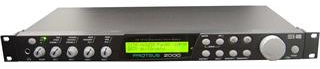
Replacing the Rotary Encoder on a Proteus 2000
http://learnsax.co.uk/docs/replace-encoder.pdf
Switch, Encoder 16MM 24 Detents Vertical mount.
Bourns PEC164215FN0024 encoder for replacement.
I used a BI TECHNOLOGIES/TT ELECTRONICS, EN16-H20AF15, INCREMENTAL ENCODER purchased on EBay UK. ?4.75
INCREMENTAL ENCODER
Pin vertical/down facing
Not pc horizontal rear facing
? Encoder Resolution:24CPR
? Encoder Type: Incremental
? Leaded Process Compatible:Yes
? No. of Detents:0
? Series:EN16
Locate the encoder pcb remove screws mark the ribbon cable with felt tip at pin 1.
Remove the pcb.
Use a solder sucker to remove the old encoder the following picture shows the encoder broken apart.
The middle spring is the detent.
The new encoder ready for soldering
After replacing the encoder refit the PCB
Making sure all the cables are correctly
Located.
open the user pdf help page
http://learnsax.co.uk/docs/replace-encoder.pdf
46
Electronic Media Devices / Proteus 2000 19 inch Midi rac...
Last post by Tony Edge - September 30, 2013, 09:07:38 PMSound sim cards are available but at very high cost they could cost over ?100
On ebay I purchased 9 blank simms for ?10
My proposal is to build read/write modules for less than ?10.
My ideas so far. Download the file in office 2003 doc format.
learnsax.co.uk.docs/make-simms.doc
Download the file as a .pdf
learnsax.co.uk.docs/make-simms.pdf
Ideas to use emu blank simms PC10498 Rev A 32mb Sound Rom W/2Mb Flash
purchased on ebay nine for ?10 for Proteus 2000
U5 is a LH28F-160S5T-L10A
low-cost, nonvolatile, read/write storage. 100,000 Block Erase Cycles
Configurable x8 or x16 I/O
------------------------------------------------------------------------------------------------------------
U6 is a 74ACT138 3 TO 8 LINE DECODER
------------------------------------------------------------------------------------------------------------
Various options could be used to program the flash memory.
EZoFlash. Parallel memory programmer.
http://www.ezoflash.com/adapters.htm
Programmer EZoFlash support :
? 8bit , 8/16bit and 16 bit flash memory in TSOP, PSOP, DIP and PLCC packages,
? EPROM, E(E)PROM and E2PROM parallel memory, FWH/LPC and AT89C51 family,
? +3.3V and +5.0V Vcc devices,
? address range to 64Mbit (..A22),
? +12V driver for programming and temporary sector unprotection,
? adapters with standard sockets for DIP and PLCC devices,
? adapters with memory chip soldering or surface mount identical footprint sockets (Meritec, Yamaichi) for TSOP , PSOP and SSOP devices,
? software commands - get ID, read, verify, erase, blank check and program.
? Latest version EZoFlash4v5 support serial EEPROM (I2C, Microwire, SPI), SPI Flash, Microchip PIC, Atmel AVR-8bit MCU (ATmega, ATtiny, AT90)
Just one solution to read/write EMU U5. Make a ribbon cable header to a 72pin simm socket
Use Ezoflash free software
Download the Schematic Part list PCB Component layout Download package
From http://www.ezoflash.com/ezoflash.htm
Option 2 http://uk.farnell.com/raspberry-pi
The Raspberry Pie should be fairly easy to program i/o
But would need a simple interface to the EMU simm skt
And a patch cable. Memory addressing could use a cmos16 bit up down counter I/C and a bi/direction data buffer I/C and control lines.
SSOP 56 sockets are available but very expensive you could even burn/prog chips prior to soldering.
So far this is just at the ideas stage and the topic is open to develop a low cost read/write sound rom.
Cost so far blank C10498 sim bought on ebay aprox ?1 each
U5 LH28F-160S5T-L10A ?4 each (Used on Sisco router)
U6 74ACT138 ?1
Ezoflash programmer no cost parts can be salvaged from scrap computer boards
May need to buy film and photo pcb and etch ?5.
Tony Edge
47
Electronic Media Devices / Proteus 2000 19 inch Midi ra...
Last post by Tony Edge - September 30, 2013, 08:56:18 PMProteus 2000 released in 1999 a 19 inch Midi rack sound module based on Audity 2000 released in 1998. It contained over a thousand waves utilising 32 megabytes of ROM. It featured up to 128 voice polyphony and 32-part multi-timbrality. It could be expanded with slots for three additional sound ROM cards.48
The very best free downloads / Re: Free Podcast on Saxophone ...
Last post by Tony Edge - August 24, 2013, 08:59:03 PMJust arrived back home after 7 hours driving
Delighted with Dab radio received Jazz FM in the remote parts of North Wales.
Lovely journey listening to the pod casts on Saxophone made the journey a joy.
For me to name just two interesting tips gained from the lectures I need to work on.
(1) Watch the masters of saxophone on You tube when they play fast music you can hardly see their fingers move. Try and keep your fingers touching the pearls but remember on tenor this is not easy for many.
(2) Most of the players practice with a metronome.
One of the discussions mentioned should Tenor sax or Alto lead.
One of the podcasts reinforced my thinking
I like to use sibelius to practice. The source of music could be a midi file or a scanned sheet with melody and piano.
I like to play the music in Band in a Box change the melody instrument to Tenor Sax With ctrl alt 5 or ctrl alt 6 change the key that sound nice and is within easy play range.
Quite often dropping an octave.
A problem encountered the piano sounds too low.
With Band in a Box this is easy if I wish to keep the piano and other instrument without change. Drop just the key of Sax with 3rd 5th or octave by using [melody] , [edit melody track], [transpose melody only] or use the similar for the melody if in the soloist track.
Add any extras such as improvisation and chords. When happy
Save all to a midi file.
Open Sibelius and import the midi file.
I find for practice I like the play along you can see all instruments the play along vertical line cursor is very precise.
I noticed during playing along watching the notation if I played the tenor sax note a little before the same note for piano did not sound as good as if I played the sax note when the cursor line was just to the right hand side of the notehead.
Delighted with Dab radio received Jazz FM in the remote parts of North Wales.
Lovely journey listening to the pod casts on Saxophone made the journey a joy.
For me to name just two interesting tips gained from the lectures I need to work on.
(1) Watch the masters of saxophone on You tube when they play fast music you can hardly see their fingers move. Try and keep your fingers touching the pearls but remember on tenor this is not easy for many.
(2) Most of the players practice with a metronome.
One of the discussions mentioned should Tenor sax or Alto lead.
One of the podcasts reinforced my thinking
I like to use sibelius to practice. The source of music could be a midi file or a scanned sheet with melody and piano.
I like to play the music in Band in a Box change the melody instrument to Tenor Sax With ctrl alt 5 or ctrl alt 6 change the key that sound nice and is within easy play range.
Quite often dropping an octave.
A problem encountered the piano sounds too low.
With Band in a Box this is easy if I wish to keep the piano and other instrument without change. Drop just the key of Sax with 3rd 5th or octave by using [melody] , [edit melody track], [transpose melody only] or use the similar for the melody if in the soloist track.
Add any extras such as improvisation and chords. When happy
Save all to a midi file.
Open Sibelius and import the midi file.
I find for practice I like the play along you can see all instruments the play along vertical line cursor is very precise.
I noticed during playing along watching the notation if I played the tenor sax note a little before the same note for piano did not sound as good as if I played the sax note when the cursor line was just to the right hand side of the notehead.
49
The very best free downloads / Free Podcast on Saxophone Best...
Last post by Tony Edge - August 23, 2013, 12:45:37 AMIf you are planning a long journey and want to listen to talks on how to improve your saxophone playing.
Download some brilliant talks by some of the masters of the saxophone these will be sure to keep you entertained for hours.
These can be downloaded for free, as .mp3 format.
The website http://www.bestsaxophonewebsiteever.com/
The podcast link http://www.bestsaxophonewebsiteever.com/tag/podcasts/
With tutorials on saxophone Techniques
http://www.bestsaxophonewebsiteever.com/category/best-saxophone-tips-and-techniques/
Learn from the lectures from some of the saxophone players.
http://www.bestsaxophonewebsiteever.com/category/best-saxophone-players/
These days many car radios have sockets for mp3 players.
My car had an old radio and no input sockets.
I love listening to Jazz FM but is only available on DAB Radios
So it was time for a change the reviews for a low cost car dab radio
The Mutant MT5068DAB Car Stereo RDS DAB Radio with USB, CD, WMA, MP3, iPod, iPhone and SD Card were very good with prices with delivery just a little over ?70 on EBay.
Fitting was quite easy once the old radio had been removed the connectors on most are standard ISO. Hiding the tiny Dab antenna wire took a bit of fiddling but with a bit of patience with a small length of ring main cable stripped to just one insulated wire.
After 5 minutes managed to reach the door frame and secured the tiny SMA Antenna
with some gaffer tape and carefully pulled the wire back to the radio.
Switched on with the antenna mounted near the windscreen pillar.
Bingo!!
Looking forward to a 7 hour drive tomorrow the company of Jazz FM and the "Free Podcast on Saxophone Best Saxophone Web Site Ever dot com" downloaded to a tiny ultra cheap mp3 player.
Happy motoring
Tony
Download some brilliant talks by some of the masters of the saxophone these will be sure to keep you entertained for hours.
These can be downloaded for free, as .mp3 format.
The website http://www.bestsaxophonewebsiteever.com/
The podcast link http://www.bestsaxophonewebsiteever.com/tag/podcasts/
With tutorials on saxophone Techniques
http://www.bestsaxophonewebsiteever.com/category/best-saxophone-tips-and-techniques/
Learn from the lectures from some of the saxophone players.
http://www.bestsaxophonewebsiteever.com/category/best-saxophone-players/
These days many car radios have sockets for mp3 players.
My car had an old radio and no input sockets.
I love listening to Jazz FM but is only available on DAB Radios
So it was time for a change the reviews for a low cost car dab radio
The Mutant MT5068DAB Car Stereo RDS DAB Radio with USB, CD, WMA, MP3, iPod, iPhone and SD Card were very good with prices with delivery just a little over ?70 on EBay.
Fitting was quite easy once the old radio had been removed the connectors on most are standard ISO. Hiding the tiny Dab antenna wire took a bit of fiddling but with a bit of patience with a small length of ring main cable stripped to just one insulated wire.
After 5 minutes managed to reach the door frame and secured the tiny SMA Antenna
with some gaffer tape and carefully pulled the wire back to the radio.
Switched on with the antenna mounted near the windscreen pillar.
Bingo!!
Looking forward to a 7 hour drive tomorrow the company of Jazz FM and the "Free Podcast on Saxophone Best Saxophone Web Site Ever dot com" downloaded to a tiny ultra cheap mp3 player.
Happy motoring
Tony
50
The very best free downloads / Blues Scales for Tenor Saxopho...
Last post by Tony Edge - July 09, 2013, 01:01:28 AMWarm up with the blues scales in all keys.
Download the free blues.pdf by right clicking the pdf and save as.
http://learnsax.co.uk/docs/blues-scales.pdf
Download the midi file
http://learnsax.co.uk/docs/blues-scales.mid
Download the Sibelius 6 score blues-scale.sib
http://learnsax.co.uk/docs/blues-scales.sib
Play the Band In a Box 2012 version blues-scales.mp3
http://learnsax.co.uk/docs/blues-scales.mp3
Download the free blues.pdf by right clicking the pdf and save as.
http://learnsax.co.uk/docs/blues-scales.pdf
Download the midi file
http://learnsax.co.uk/docs/blues-scales.mid
Download the Sibelius 6 score blues-scale.sib
http://learnsax.co.uk/docs/blues-scales.sib
Play the Band In a Box 2012 version blues-scales.mp3
http://learnsax.co.uk/docs/blues-scales.mp3